
What is encryption and how does it work?
What is encryption?
Encryption is “any procedure used in cryptography to convert plain text into ciphertext to prevent anyone but the intended recipient from reading that data”[1]. The way encryption works is it takes some data that you want to protect and transforms it in a way that it can only be restored to its original form if you or the recipient of the data have a special key. For example, encrypting the plain text “Encryption is awesome!” would yield ciphertext like the following:
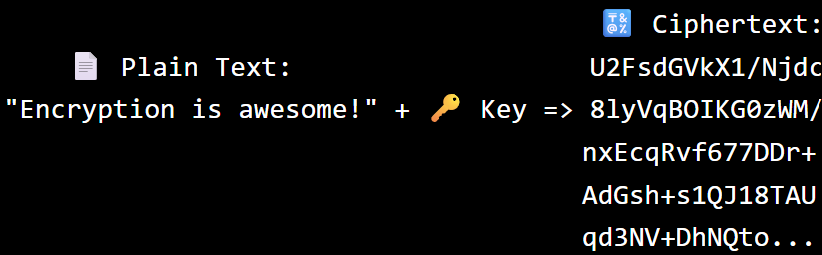
In its encrypted form like this, called ciphertext, even if a cyber criminal got a hold of your message it would be complete gibberish to them and they would have no idea that you were proclaiming your love for how awesome encryption is. Only somebody with a special key could transform the ciphertext back into the original message “Encryption is awesome!”. The process of transforming ciphertext back to its original form is called decryption.
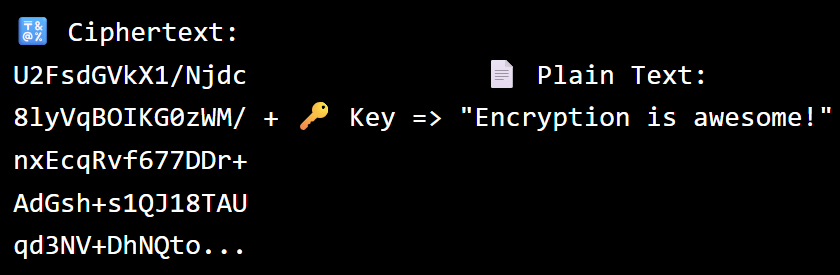
So, we’ve already learned three things:
- Encryption transforms data to gibberish looking ciphertext
- Decryption transforms the gibberish looking ciphertext back to the original data
- Encryption and decryption can only be performed with some special key thing
Encryption can be used for different purposes. In this post, we’re going to focus on using encryption for secure communication across the internet.
The Keys to Encryption
As described above, what encryption and decryption do are transform data to gibberish ciphertext and then transform the ciphertext back to the original data. That’s what’s actually happening on a computer. To understand how this is happening imagine two friends, Alice and Bob. They just graduated high school and will be going to college on opposite sides of the country. As kids they spent lots of time developing secret codes and languages. When they go to college they still want to exchange messages without fear of their messages being intercepted.
Before the age of computers, they might buy a strong metal box with a lock and they each get a copy of the key. They would do this in person before going to college so they know that they are the only ones with a key to the lock.

If Alice wants to send Bob a message, she puts her message in the box, locks it with her copy of the key and sends it to Bob. As it travels through the postal service it doesn’t matter who handles it because the box is locked. Only Bob with his copy of the key can unlock it and read Alice’s message.

Encrypting data on a computer is like putting the data in a box and locking it with a key. Decrypting data on a computer is like unlocking the box so you can view what’s inside. In encryption, the key can be represented different ways. One common way to represent the key is as a file on your computer with some very large numbers in it. Instead of locking the data in a box, the computer uses the numbers in the key file to perform some fancy math that transforms your data into ciphertext.

Similarly, it uses the numbers in the key file to transform the ciphertext back to the original data.

So, let’s see what secure communication between Alice and Bob might look like if they are communicating digitally using computers and encryption. Like in the physical world example, they would create a key, in this case a key file, and each save a copy of it on their computer. They would do this in person before going to college so they know that they are the only ones with a copy of the key file on their computer.

If Alice wants to send Bob a secure message, she will encrypt the message using the key file. This will generate gibberish looking ciphertext. The gibberish ciphertext is what she sends to Bob. As her message travels across the internet to Bob it doesn’t matter who sees it because it will be useless gibberish to them. Only Bob, with his copy of the key can decrypt the ciphertext and read Alice’s message.

In our example so far, Alice and Bob have both been using copies of the same key. In encryption this is called symmetric encryption. Symmetric encryption is when the same key is used for encrypting and decrypting data. Symmetric encryption can be and is used for secure communication but it does have some drawbacks and the biggest of which is the key sharing problem.
To use symmetric encryption for secure communication each person needs a copy of the same key. In our example, Alice and Bob did this in person so that they knew they were the only ones with copies of the key. But what if in the middle of the semester Bob loses his key? (c’mon Bob!) Now he and Alice need to make a new key that they each get a copy of. But this isn’t practical with them living at opposite ends of the country. Also, crazy thought, what if Alice and Bob want to securely communicate with other people besides Alice and Bob? Each time they wanted to securely communicate with somebody new they would have to make a new key and find some way to each get a copy without anybody else accessing the key and potentially making their own copy. There must be a better way! Luckily there is and it is called asymmetric encryption also known as public key encryption.
Public Key Encryption
To understand how public key encryption works, let’s revisit Alice and Bob communicating before the age of computers. Once again they buy a strong metal box with a lock. But this is no ordinary lock. It’s a seemingly magical lock. Instead of being locked and unlocked by a single key it is locked and unlocked by pairs of keys. As long as the pair of keys are made the right way, one key in the pair will lock the box and one key in the pair will unlock the box. And it doesn’t just work for one pair of keys. As long as the pair of keys are made correctly you can make a seemingly infinite number of unique pairs of keys that will lock and unlock the box.
So, Alice and Bob each make their own unique pair of keys. One will lock the box and one will unlock the box. Alice and Bob will each take the key that unlocks the box and they will keep it in a secure place where nobody else can access it. This is their private key. The other key in their pair locks the box and is their public key. Alice will make a copy of her public key and give it to Bob and Bob will make a copy of his public key and give it to Alice.

If Alice wants to send a message to Bob, she will put the message in the box and lock it using Bob’s public key. Since it was locked with Bob’s public key, only Bob can unlock the box using his private key.

Similarly, if Bob wants to send a message back to Alice, he will put the message in the box and lock it with Alice’s public key. Since it was locked with Alice’s public key, only Alice can unlock the box using her private key.

This is exactly how public key encryption works on a computer. Again, instead of physical keys Alice and Bob have key files on their computer. One is their public key and one is their private key. The public key is used to encrypt data and the private key is used to decrypt data. The private key stays private. Alice and Bob each keep their private key on their computer and they don’t share it with anybody else. They will send copies of their public key to each other. NOTE: Public and private keys do not always have to be used in this exact way. For example, when creating digital certificates a private key is used to encrypt and when validating digital certificates the corresponding public key is used to decrypt. But for our use case where the goal is to keep data secret the public key is used used to encrypt data and the private key is used to decrypt data.

If Alice wants to send a message to Bob, she will encrypt the message using Bob’s public key. Since it was encrypted with Bob’s public key, only Bob can decrypt it using his private key.

Similarly, if Bob wants to send a message to Alice, he will encrypt the message using Alice’s public key. Since it was encrypted with Alice’s public key, only Alice can decrypt it using her private key.

As you may have noticed, public key encryption with each person having unique pairs of keys, solves the key sharing problem of symmetric encryption. With public key encryption, if halfway through the semester Bob accidentally deletes his private key from his computer(seriously Bob!) it’s not actually that big of a deal. He just has to generate a new pair of keys and send his new public key to Alice or anybody else he wants to securely communicate with. This doesn’t have to be done in person or in any secretive way. He can just send his public key across the internet to whoever it is he wants to securely communicate with. It doesn’t matter who sees it as it travels across the internet because Bob’s public key is just used for encrypting data sent to him. Only his private key, which he does keep private on his computer, can be used to decrypt data sent to him.
The best of both worlds
Let’s review what we have learned and then look at an example of how symmetric encryption and asymmetric or public key encryption might be used today.
- Encryption transforms data to gibberish looking ciphertext
- Decryption transforms the gibberish looking ciphertext back to the original data
- Encryption and decryption can only be performed with some special keys
- Symmetric encryption is when the same key is used for encryption and decryption
- People communicating using symmetric encryption need to have copies of the same key
- The shared key in symmetric encryption cannot be sent unprotected
- This presents challenges for both parties getting copies of the shared key
- Asymmetric or public key encryption uses pairs of keys
- Each person generates their own pair of keys: a private key and a public key
- The public key is used for encrypting data and data encrypted with a public key can only be decrypted with the corresponding private key
- The private key is used for decrypting data that was encrypted with the corresponding public key
- Public key encryption eliminates the key sharing problem of symmetric encryption because the public key can be sent across the internet and it doesn’t matter who sees it
From what we’ve covered so far you may be wondering what is the value of symmetric encryption? I mean, it has this major key sharing issue that public key encryption doesn’t have. Why don’t we just use public key encryption for everything? The answer is that symmetric encryption algorithms run much faster than public key encryption algorithms[2]. So, when encrypting and decrypting large amounts of data, symmetric encryption can do it much faster which is important and even critical for some applications.
So, how is symmetric encryption used today? A common way that it is used is in conjunction with public key encryption. Imagine you are having a video call with your doctor. During the call you are sending large amounts of audio and video data to each other. You want that data to be encrypted so that some random person on the internet can’t eavesdrop on your call. But you also want the call to be smooth without any lags or choppiness. This means the encryption and decryption of the audio and video data needs to be fast, really fast. So, it needs to use symmetric encryption. But you and the doctor don’t yet have a shared key that you can use for symmetric encryption. What happens is when joining the call, you and the doctor will exchange public keys.

Now you have a way to communicate securely via public key encryption. One way to get a shared key that you and the doctor can use for symmetric encryption of the audio and video data during the call is for you to generate it on your computer. You will then encrypt the shared key using the doctor’s public key and send it to the doctor.

Since the shared key was encrypted with the doctor’s public key, only the doctor can decrypt it using their private key. Once the doctor has decrypted the shared key it means that you and the doctor both have a copy of the same shared key that you can now use for symmetric encryption of the audio and video data for the duration of the call.

The Good News
If while reading this post you got a little worried because you’ve never created public and private keys or encrypted data before sending it, I have good news, your computer has been doing it for you. All major web browsers, popular websites and messaging apps use encryption to protect your data as it travels across the internet. They handle the key generation, key exchanges and encryption / decryption so that we can focus on texting, posting, gaming, shopping, streaming and anything else we do online.
[1] https://csrc.nist.gov/glossary/term/encryption
[2] https://www.fortinet.com/resources/cyberglossary/encryption